Category Archives: PastNews

MAINTENANCE (2023/12/24)

2023/12/24 (SUN) 10:00 – 20:00

1. Web servers, CGI servers
– Suspended for a few minutes between 10:00 and 18:00.

2. License management
– Between 10:00 and 18:00, unavailable for approximately 30 minutes.

– The License Management Server will be suspended; therefore the applications below cannot be used:

ArcGIS Desktop
Mathematica
MATLAB
SPSS
FICO Xpress
VectorWorks

Note:
Regarding the campus site license, the following applications installed on computers not belonging to the Zengaku Computer System will also be unavailable during this time:
SPSS, ArcGIS, Mathematica (Comprehensive Program) and Vectorworks.

3. Printers
– Between 10:00 and 18:00, unavailable for approximately 30 minutes.

4. Remote servers (Windows : view-con00, Linux : icho01, icho02, kiri)
– Unavailable between 10:00 and 20:00.
Note:
Services will be resumed in the order in which maintenance work is completed.
If you are using a remote desktop when the maintenance starts, a pop-up message will appear; please log off from there.
(Please be aware that the system will log you off automatically in 10 minutes.)

MAINTENANCE (2023/11/19)

2023/11/19 (SUN) 10:00 – 20:00

1. Web servers, CGI servers
– Suspended for a few minutes between 10:00 and 18:00.

2. License management
– Between 10:00 and 18:00, unavailable for approximately 30 minutes.

– The License Management Server will be suspended; therefore the applications below cannot be used:

ArcGIS Desktop
Mathematica
MATLAB
SPSS
FICO Xpress
VectorWorks

Note:
Regarding the campus site license, the following applications installed on computers not belonging to the Zengaku Computer System will also be unavailable during this time:
SPSS, ArcGIS, Mathematica (Comprehensive Program) and Vectorworks.

3. Printers
– Between 10:00 and 18:00, unavailable for approximately 30 minutes.

4. Remote servers (Windows : view-con00, Linux : icho01, icho02, kiri)
– Unavailable between 10:00 and 20:00.
Note:
Services will be resumed in the order in which maintenance work is completed.
If you are using a remote desktop when the maintenance starts, a pop-up message will appear; please log off from there.
(Please be aware that the system will log you off automatically in 10 minutes.)

How to resolve the problem when authenticating Microsoft Office products on a satellite device (Update 10/16)

A problem has been observed when launching Microsoft Office products on satellite terminals.
Please check the following links for solutions to the problems that have occurred.

Office product does not start / A dialog box appears and “Error code 80090016” is displayed.

Solution
  1. Open [Start] – [Settings] – [Accounts] – [Access to work or school].
  2. Click [Disconnect] when the connected accounts are displayed.
  3. Two confirmation dialogs will appear in succession. Click [Yes] on the first dialog and [Disconnect] on the second dialog.
    When asked to restart, do so.
  4. After completing the above, start the Microsoft Office product again and enter your @u email address and password when the dialog box appears.

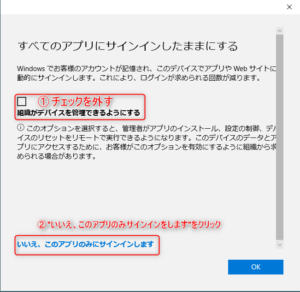
This trouble may also occur when you use a satellite device with an account that you signed in to without following the settings below when signing in at the time of Office product startup on your PC.
This procedure is different from the setting when using Office products on a satellite device. Please be careful.

The following is a reference to an image posted on the A.C.C.C. Web.
If the above does not resolve the issue, please try this as well.

When starting up Office products, a screen asking for a code number for multi-factor authentication appears even though I do not remember setting up multi-factor authentication, and you cannot proceed.

Solution

You can reset your authentication system on the following URL.
<https://portal.cc.tsukuba.ac.jp/member/microsoft365-reset-mfa/>
(When accessing this system, please log in using your Unified Authentication ID/PW).
As indicated on this page, you can reset the settings by clicking on the ‘Start to reset my MFA setting’ button.

The screen goes blank at the authentication operation and does not proceed.

When launching Microsoft Office applications on Windows Remote Desktop or Satellite Terminal of The Zengaku Computer System, the screen may go blank at the authentication process and you may not be able to proceed. In some cases, you may be asked to perform the same authentication operation several times.

Solution

You can improve the situation by disabling the multi-factor authentication setting at the following site.

Academic Computing Communications Center,University of Tsukuba
Cloud mail service authentication setting system (Microsoft 365)
https://m365setting.u.tsukuba.ac.jp/

Even if the authentication appears to be disabled on the screen, the authentication behavior may be improved by enabling it once and then disabling it again.

Alternatively, the error no longer occurs when the multi-factor authentication settings are completed to the end.

To reproduce the problem

The problem was reproduced when Office was started with the multi-factor authentication setting halfway completed.
If multi-factor authentication is enabled and the associated authentication application or phone settings are not completed, the authentication screen of the Office app version will go blank or an error message will appear.

Solution #3 added on 7/28

A new solution has been found and added to the FAQ. “Change account settings” in Windows.
Please see below for details.
Microsoft Product Authentication Failures on Terminals and Remote Access Service Solution #3

If the problem persists

If the above does not solve the problem, please also try the solution #2 in the FAQ below.
Microsoft Product Authentication Failures on Terminals and Remote Access Service

MAINTENANCE (2023/10/22)

2023/10/22 (SUN) 10:00 – 20:00

1. Web servers, CGI servers
– Suspended for a few minutes between 10:00 and 18:00.

2. License management
– Between 10:00 and 18:00, unavailable for approximately 30 minutes.

– The License Management Server will be suspended; therefore the applications below cannot be used:

ArcGIS Desktop
Mathematica
MATLAB
SPSS
FICO Xpress
VectorWorks

Note:
Regarding the campus site license, the following applications installed on computers not belonging to the Zengaku Computer System will also be unavailable during this time:
SPSS, ArcGIS, Mathematica (Comprehensive Program) and Vectorworks.

3. Printers
– Between 10:00 and 18:00, unavailable for approximately 30 minutes.

4. Remote servers (Windows : view-con00, Linux : icho01, icho02, kiri)
– Unavailable between 10:00 and 20:00.
Note:
Services will be resumed in the order in which maintenance work is completed.
If you are using a remote desktop when the maintenance starts, a pop-up message will appear; please log off from there.
(Please be aware that the system will log you off automatically in 10 minutes.)

On the operation of the Zengaku Computer System during University Wide Power Outage (October 28, 29 and November 18)

The University Wide Power Outage will take place on October 28 (Sat.), 29 (Sun.) and November 18 (Sat.).
Basic server functions (mail, Web, etc.) of The Zengaku Computer System will be available as usual.
Satellites will not be available.

(Reference)
On Computer and Network System Operations during University Wide Power Outage (October 28, 29 & November 18, 2023) (ACCC)

MAINTENANCE (2023/9/24)

2023/9/24 (SUN) 10:00 – 20:00

1. Web servers, CGI servers
– Suspended for a few minutes between 10:00 and 18:00.

2. License management
– Between 10:00 and 18:00, unavailable for approximately 30 minutes.

– The License Management Server will be suspended; therefore the applications below cannot be used:

ArcGIS Desktop
Mathematica
MATLAB
SPSS
FICO Xpress
VectorWorks

Note:
Regarding the campus site license, the following applications installed on computers not belonging to the Zengaku Computer System will also be unavailable during this time:
SPSS, ArcGIS, Mathematica (Comprehensive Program) and Vectorworks.

3. Printers
– Between 10:00 and 18:00, unavailable for approximately 30 minutes.

4. Remote servers (Windows : view-con00, Linux : icho01, icho02, kiri)
– Unavailable between 10:00 and 20:00.
Note:
Services will be resumed in the order in which maintenance work is completed.
If you are using a remote desktop when the maintenance starts, a pop-up message will appear; please log off from there.
(Please be aware that the system will log you off automatically in 10 minutes.)

MAINTENANCE (2023/8/17)

2023/8/17 (THU) 10:00 – 20:00

1. Web servers, CGI servers
– Suspended for a few minutes between 10:00 and 18:00.

2. License management
– Between 10:00 and 18:00, unavailable for approximately 30 minutes.

– The License Management Server will be suspended; therefore the applications below cannot be used:

ArcGIS Desktop
Mathematica
MATLAB
SPSS
FICO Xpress
VectorWorks

Note:
Regarding the campus site license, the following applications installed on computers not belonging to the Zengaku Computer System will also be unavailable during this time:
SPSS, ArcGIS, Mathematica (Comprehensive Program) and Vectorworks.

3. Printers
– Between 10:00 and 18:00, unavailable for approximately 30 minutes.

4. Remote servers (Windows : view-con00, Linux : icho01, icho02, kiri)
– Unavailable between 10:00 and 20:00.
Note:
Services will be resumed in the order in which maintenance work is completed.
If you are using a remote desktop when the maintenance starts, a pop-up message will appear; please log off from there.
(Please be aware that the system will log you off automatically in 10 minutes.)

MAINTENANCE (2023/7/23)

2023/7/23 (SUN) 10:00 – 20:00

1. Web servers, CGI servers
– Suspended for a few minutes between 10:00 and 18:00.

2. License management
– Between 10:00 and 18:00, unavailable for approximately 30 minutes.

– The License Management Server will be suspended; therefore the applications below cannot be used:

ArcGIS Desktop
Mathematica
MATLAB
SPSS
FICO Xpress
VectorWorks

Note:
Regarding the campus site license, the following applications installed on computers not belonging to the Zengaku Computer System will also be unavailable during this time:
SPSS, ArcGIS, Mathematica (Comprehensive Program) and Vectorworks.

3. Printers
– Between 10:00 and 18:00, unavailable for approximately 30 minutes.

4. Remote servers (Windows : view-con00, Linux : icho01, icho02, kiri)
– Unavailable between 10:00 and 20:00.
Note:
Services will be resumed in the order in which maintenance work is completed.
If you are using a remote desktop when the maintenance starts, a pop-up message will appear; please log off from there.
(Please be aware that the system will log you off automatically in 10 minutes.)

Notice of System Maintenance Work (Disk Units)

Maintenance work will be performed on the DISK device of The Zengaku Computer System.

During the work period, communication with the Disk device may be momentarily interrupted several times. It will be reconnected automatically, but there may be cases where it cannot be reconnected. In such cases, restart the PC.

The date and time of the work and the affected area are as follows.

Date: Saturday, June 24, 2023, 10:00 – 12:00
Impact:
There will be momentary disconnections from the Disk device several times during the work period. The following operations will be affected.

1) When using Windows on PCs in libraries and satellite rooms
2) When using Remote Desktop (Windows only)
3) When connecting to oldhome (O drive)
4) When connecting to sv-pool (Temporary Bulk Storage)

MAINTENANCE (2023/6/25)

2023/6/25 (SUN) 10:00 – 20:00

1. Web servers, CGI servers
– Suspended for a few minutes between 10:00 and 18:00.

2. License management
– Between 10:00 and 18:00, unavailable for approximately 30 minutes.

– The License Management Server will be suspended; therefore the applications below cannot be used:

ArcGIS Desktop
Mathematica
MATLAB
SPSS
FICO Xpress
VectorWorks

Note:
Regarding the campus site license, the following applications installed on computers not belonging to the Zengaku Computer System will also be unavailable during this time:
SPSS, ArcGIS, Mathematica (Comprehensive Program) and Vectorworks.

3. Printers
– Between 10:00 and 18:00, unavailable for approximately 30 minutes.

4. Remote servers (Windows : view-con00, Linux : icho01, icho02, kiri)
– Unavailable between 10:00 and 20:00.
Note:
Services will be resumed in the order in which maintenance work is completed.
If you are using a remote desktop when the maintenance starts, a pop-up message will appear; please log off from there.
(Please be aware that the system will log you off automatically in 10 minutes.)

MAINTENANCE (2023/5/21)

2023/5/21 (SUN) 10:00 – 20:00

1. Web servers, CGI servers
– Suspended for a few minutes between 10:00 and 18:00.

2. License management
– Between 10:00 and 18:00, unavailable for approximately 30 minutes.

– The License Management Server will be suspended; therefore the applications below cannot be used:

ArcGIS Desktop
Mathematica
MATLAB
SPSS
FICO Xpress
VectorWorks

Note:
Regarding the campus site license, the following applications installed on computers not belonging to the Zengaku Computer System will also be unavailable during this time:
SPSS, ArcGIS, Mathematica (Comprehensive Program) and Vectorworks.

3. Printers
– Between 10:00 and 18:00, unavailable for approximately 30 minutes.

4. Remote servers (Windows : view-con00, Linux : icho01, icho02, kiri)
– Unavailable between 10:00 and 20:00.
Note:
Services will be resumed in the order in which maintenance work is completed.
If you are using a remote desktop when the maintenance starts, a pop-up message will appear; please log off from there.
(Please be aware that the system will log you off automatically in 10 minutes.)

Display of printed balance at terminal login [4/24 Update]

After the scheduled maintenance on 4/23 (Sun.), the balance information of the number of sheets printed will be displayed when logging in to the terminal.
Please note that the balance information is not reflected in real time.


Due to a software failure in the printing system, the balance of the number of sheets printed cannot be displayed when logging in.
This issue will be resolved during the scheduled maintenance on April 23 (Sun.), as it requires a software upgrade.

The print balance can be checked on the printer’s operation screen or Web Print.

We apologize for the inconvenience.

Trouble with Terminal and Remote Desktop Service (4/11 update)

Trouble with Windows sign-in for the first time

When signing in to Windows for the first time, there is a problem that the profile is not generated completely.
Please sign out when signing in for the first time, and then sign in again to start using the terminal.
If you encounter this problem, please see the following for details.
Cannot find installed software in “All Apps”

Microsoft Product Authentication Problems

When launching Microsoft Office applications on Windows Remote Desktop or Satellite Terminal of The Zengaku Computer System, the screen may go blank at the authentication process and you may not be able to proceed. In some cases, you may be asked to perform the same authentication operation several times.
Microsoft Product Authentication Failures on Terminals and Remote Access Service

The Zengaku Computer System Printer Failure (4/5 update)

We have fixed this problem on 4/4. We apologize for the inconvenience.

In addition, the following is explained

  • Zengaku_Printer(Mono):
    Standard settings for monochrome printing are used
  • Zengaku_Printer(Color):
    Standard setting for color printing

Please be careful when using the printer.


Zengaku_Printer(Mono) is not working properly on the printers in The Zengaku Computer System.
We are currently working on a fix. We are working on the fix so that it will be completed by the start of tomorrow’s orientation.

This problem was also occurring on Windows Remote Access, but we have completed the fix and are now confirming the problem.

If you are in a hurry, please use Zengaku_Printer(Color), which can output both color and monochrome images, as a workaround.

Zengaku_Printer(Charge) outputs to the printer that is charged.

If “Zengaku_Printer(Color)” does not appear as an option when printing from a browser such as Chrome, please click “More”.

In addition, due to a software glitch in the print system, it is no longer possible to retrieve balance information on the number of copies printed.
Therefore, we have hidden the print balance information in the login message.
Please wait for a while as the software needs to be upgraded for this failure.

MAINTENANCE (2023/4/23)

2023/4/23 (SUN) 09:00 – 20:00

1. Web servers, CGI servers, Unix servers
– Suspended for a few minutes between 10:00 and 16:00.

2. License management
– Between 10:30 and 15:00, unavailable for approximately 30 minutes.

– The License Management Server will be suspended; therefore the applications below cannot be used:

Mathematica
SPSS
MATLAB
ArcGIS Desktop

Note:
Regarding the campus site license, the following applications installed on computers not belonging to the Zengaku Computer System will also be unavailable during this time:
SPSS, ArcGIS, Mathematica (Comprehensive Program).

3. Printers (including On-demand terminals)
– Between 09:00 and 18:00, each one unavailable for approximately 90-120 minutes.

4. Remote servers (Windows : view-con00, Linux : icho01, icho02, kiri)
– Unavailable between 10:00 and 20:00.
Note:
If you are using a remote desktop when the maintenance starts, a pop-up message will appear; please log off from there.
(Please be aware that the system will log you off automatically in 10 minutes.)