Category Archives: PastNews

Transfer user home files from the current system to the new system (Details) Update 3/20

We would like to inform you of details regarding the transfer of user home files from the current system to the new system.
There are some modifications from this previous announcement. Please note the following.

  • The old user home is migrated separately from each user’s home.
    This is because if the various configuration files are migrated as they are, problems may occur when logging in (signing in) on the new system.
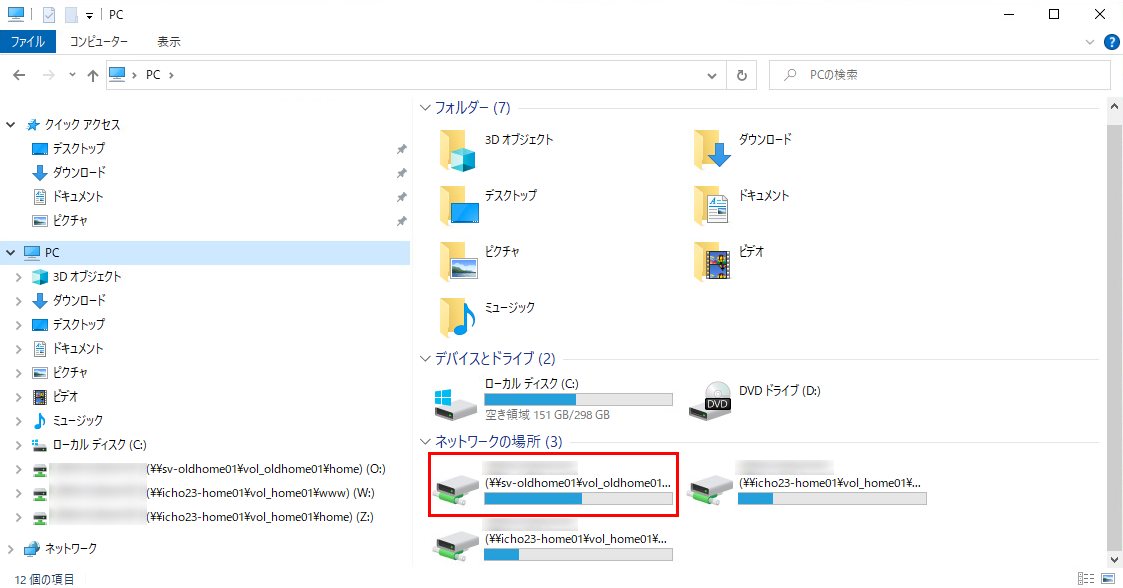
    The old home is read-only. Please copy the necessary files to the new home before use.
     Windows environment: O drive.
     Linux environment: /oldhome/UTID-NAME.
            (UTID-NAME is your login name)
  • Each user’s web-publishing folders (directories) have been migrated. These folders (and the files in them) can be used as in the old system.
  • Your .ssh folders of users who had set up public keys in the old system have been migrated.
  • All other files and directories, including files and directories other than the above directly under home, will not be transferred to the new system directly under user home, so please be very careful. Please copy all necessary files to the new system by yourself. Configuration files and program files used in the old system may not be usable in the new system, so please copy them at your own risk.

The following is a screen shot of O drive using Explorer on Windows.
oldhome-explore

MAINTENANCE (2023/3/19)

2023/3/19 (SUN) 09:00 – 20:00

1. Web servers, CGI servers, Unix servers
– Suspended for a few minutes between 10:00 and 16:00.

2. License management
– Between 10:30 and 15:00, unavailable for approximately 30 minutes.

– The License Management Server will be suspended; therefore the applications below cannot be used:

Mathematica
SPSS
MATLAB
ArcGIS Desktop

Note:
Regarding the campus site license, the following applications installed on computers not belonging to the Zengaku Computer System will also be unavailable during this time:
SPSS, ArcGIS, Mathematica (Comprehensive Program).

3. Printers (including On-demand terminals)
– Between 09:00 and 18:00, each one unavailable for approximately 90-120 minutes.

4. Remote Desktop servers (remote-s, remote-t, icho00〜icho09)
– Unavailable between 10:00 and 20:00.
Note:
If you are using a remote desktop when the maintenance starts, a pop-up message will appear; please log off from there.
(Please be aware that the system will log you off automatically in 10 minutes.)

Closing Period of Satellite Rooms

Satellite rooms will be unavailable for a while due to the updating of the Zengaku Computer System.
Please check Availability of Satellite Rooms for the available hours of each satellite room and the period during which the rooms will be closed.

Transfer user home files from the current system to the new system (Updated 3/9)

Added 3/9: The notice regarding this matter has been posted. Some details have been changed from the following. Please note the changes.

The user home in the current system, including all its files, is transferred to the new system in the old-icho2017 folder under the user home.
The contents of this folder are read-only.

The old-icho2017 directly will be accessible for at least one year, but access after that time is not guaranteed.
Each user should copy the necessary files to the new system.

The user data drive (Z:\), web data drive (W:\) (including www, wwws directories), and .ssh directory will be migrated to the new system.

More details will be provided in follow-up reports.

How to connect to Windows Remote Desktop on the Next Zengaku Computer System

Connecting to Windows Remote Desktop on the next Zengaku computer system is different from the current system.
The important points are as follows

 * To connect to the remote desktop, use VMware Horizon Client or access the specified URL in an HTML5-capable browser.

You cannot connect (via Remote Desktop Protocol, RDP) using the Windows Remote Desktop Connection (mstsc.exe) and Microsoft Remote Desktop for Mac.

Network Maintenance (March 26, 2023, 9:00-11:00)

The following work will be performed to update the University of Tsukuba’s SINET connection lines.
During the connection change work, communication with off-campus and communication between Tsukuba Campus, Tokyo Campus, and related facilities will be temporarily disconnected.

Date and Time: Sunday, March 26, 2023, 9:00 – 11:00

Please see the following notice for details.
Renewal of off-campus connection and Tokyo Campus connection lines for the Backbone Network (2023/3/26)

Change the Email System

The Zengaku Computer System will be updated at the end of the FY 2022.

Along with this, there is a change in the email system.
Details will be announced around February 2023.
We will inform you of a brief outline of the plan at this moment.

For faculty and staff (including professor emeritus) using @u.tsukuba.ac.jp address

The mail system will be migrated to the M365 (Microsoft) environment.
The mailboxes will be migrated by the Academic Computing and Communications Center.
If you are using webmail (Active! mail), Active! mail will no longer be available.
Microsoft webmail will be provided.
If you are using email software (Thunderbird, Outlook, etc.), you will need to change your settings.
The ID and password will be the same as for Microsoft Teams.

For students (enrolled in or before FY 2016) using @u.tsukuba.ac.jp address

The procedure is the same as “Faculty and staff (including professor emeritus) using @u.tsukuba.ac.jp”.

For students (enrolled in or after FY 2017) using @s.tsukuba.ac.jp address

After the system is updated, the email address of a student will be @u. The currently using @s address will continue to work.
(Only @u will be available for students enrolling after FY 2023) After the system is updated, announcements from the university will be delivered to @u.
@s and @u are completely different systems.