全学計算機システム (Zengaku Computer System) – 筑波大学 学術情報メディアセンター

Search
Skip to content
  • CONTACT
  • 日本語

A message saying “You have exceeded your profile storage space. …” is displayed / About roaming profile on Windows

A

A message saying “You have exceeded your profile storage space. …” is displayed / About roaming profile on Windows

About roaming profile

On Windows of the Zengaku Computer System, some profiles (such as application settings and browser’s cache) are saved as “roaming profile” when signing out, and are reloaded the next time you sign-in. However, there are some applications which do not save settings into the roaming profile.

The size of roaming profile has an upper limit, and it is set to be 10 GB. If you exceed this limit when signing-out, the roaming profile will not be saved. The next time you sign in, the last saved roaming profile will be reloaded. If you exceed the limit during signing-in, the following message will be displayed at every 15 minutes.

プロファイル格納領域がいっぱいになりました。ログオフする前に、プロファイルの項目をネットワークまたはローカルの記憶域に移動してください。
詳しくは以下の Web ページをご覧ください。
https://130.158.234.43/old-icho2017/ufaqs/windows-roaming-profile/

You have exceeded your profile storage space.  Before you can log off, you need to move some items from your profile to network or local storage.
For details, please refer to the following webpage.
https://130.158.234.43/old-icho2017/ufaqs/en-windows-roaming-profile/

How to check the size of your roaming profile

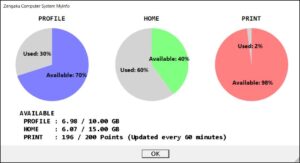
The size of the roaming profile currently in use and the maximum size limit for the roaming profile can be displayed by running
“Zengaku Computer System MyInfo” from the Start menu in the Windows environment of the Zengaku Computer System.
How to reduce roaming profile

* Pay close attention and do at your own risk when managing roaming profile. Consider taking a backup before an operation.

Your roaming profile is stored in a location different from the user home (Z: drive). There are the following methods to reduce it.

  1. Browser’s temporary files (browsing history, cookies, cache) are often inflated, so delete them with a browser you often use. There are also cases where large files for Slack and LINE are created in the roaming profile, so if you are using these applications, delete those files that you can delete from those applications. If you know something about another application that saves settings etc in the roaming profile, also delete settings and data in it.
    Go to 2 if the above still does not work.
  2. Initialize the profile.
    If you do not want to initialize your settings, go to 3.
  3. Delete some files of your choice (after backing up, if possible) under C:\Users\Username. You can check the size of a file or a folder by right-click → Properties.
Permalink

Post navigation

Previous Post「プロファイル格納領域がいっぱいになりました。・・・」と表示されます / Windows の移動プロファイルについてNext PostOutlook や Mac 、iOS のメールクライアントでは SMTP や IMAP、POP を利用できますか

NEWS AND NOTICE

  • Access Restrictions for the Zengaku Computer System(2026/11/04)
    2026年11月4日
  • MAINTENANCE (2026/11/29)
    2026年11月1日
  • Launch of USB flash drive printing service on selected printers in the Zengaku Computer System
    2026年7月27日
  • E-Learning Course “INFOSS Information Ethics”
    2026年4月1日
  • Installation of Anti-Virus Software on Your PC
    2026年4月1日
  • To everyone leaving the university due to graduation, completion of studies or retirement
    2026年1月1日
  • To @u.tsukuba.ac.jp E-Mail Address (Zengaku Computer System) Users Leaving University of Tsukuba
    2026年1月1日
  • Attention on use of Dropbox etc. on the Zengaku Computer System
    2024年4月1日
  • Warning: Do not use outlet in satellite computer rooms
    2024年3月31日

[View All]

  • 日本語
  • System Overview
    • System Overview
    • Server Information
    • Software Information
  • Satellite Computer Rooms
  • System Guideline
  • Information Literacy
    • Handbook for Information Literacy (in Japanese) (Internal site)
    • Syllabus (KDB)
  • ICT Guide
  • Log-in, Password
    • Accounts
    • Remote Access
    • Changing/Resetting Your Password
    • Login with a Public Key
  • E-mails
    • E-mails of Zengaku Computer System
    • Lifetime Email Addresses
    • Mail Forwarding Setup (Microsoft 365)
    • Confirming mailbox usage / How to move your email data to another location
  • Printing
    • Printing
    • Print Management
    • Charged Printing Service
  • Personal Setup
    • Environment Setup
    • Notification for USB Flash Devices
    • Disk Usage/Extension
    • Publishing Web Content
  • Troubles, FAQ
    • FAQ
    • Initialize User Profile (on-campus only)
    • Recovery of Deleted Data
  • Other Information
    • Temporary Bulk Storage
    • How to launch the Explorer (Windows)
    • How to change default apps (Windows)
    • When using a headphone or an earphone
    • Screenlock and Automatic Sign-out/Log-out
  • LINKS
    • University of Tsukuba
      • University Home
      • TWINS
      • TULIPS
    • Academic Computing and Communications Center
      • ACCC Home
      • Unified Authentication System
      • e-Learning (manaba)
  • To everyone leaving the university due to graduation, completion of studies or retirement
    • To everyone leaving the university
    • To @u.tsukuba.ac.jp E-Mail Address
  • Staff Only
    • 教職員向けお知らせ
    • 時間割
    • 消耗品発注の流れについて
    • プリンタトナーコンテナ交換方法
    • 給紙カセットの用紙状態確認方法
  • A.C.C.C. Portal Site
筑波大学学術情報メディアセンター© 2017-2026